
Why secure storage matters for restaking
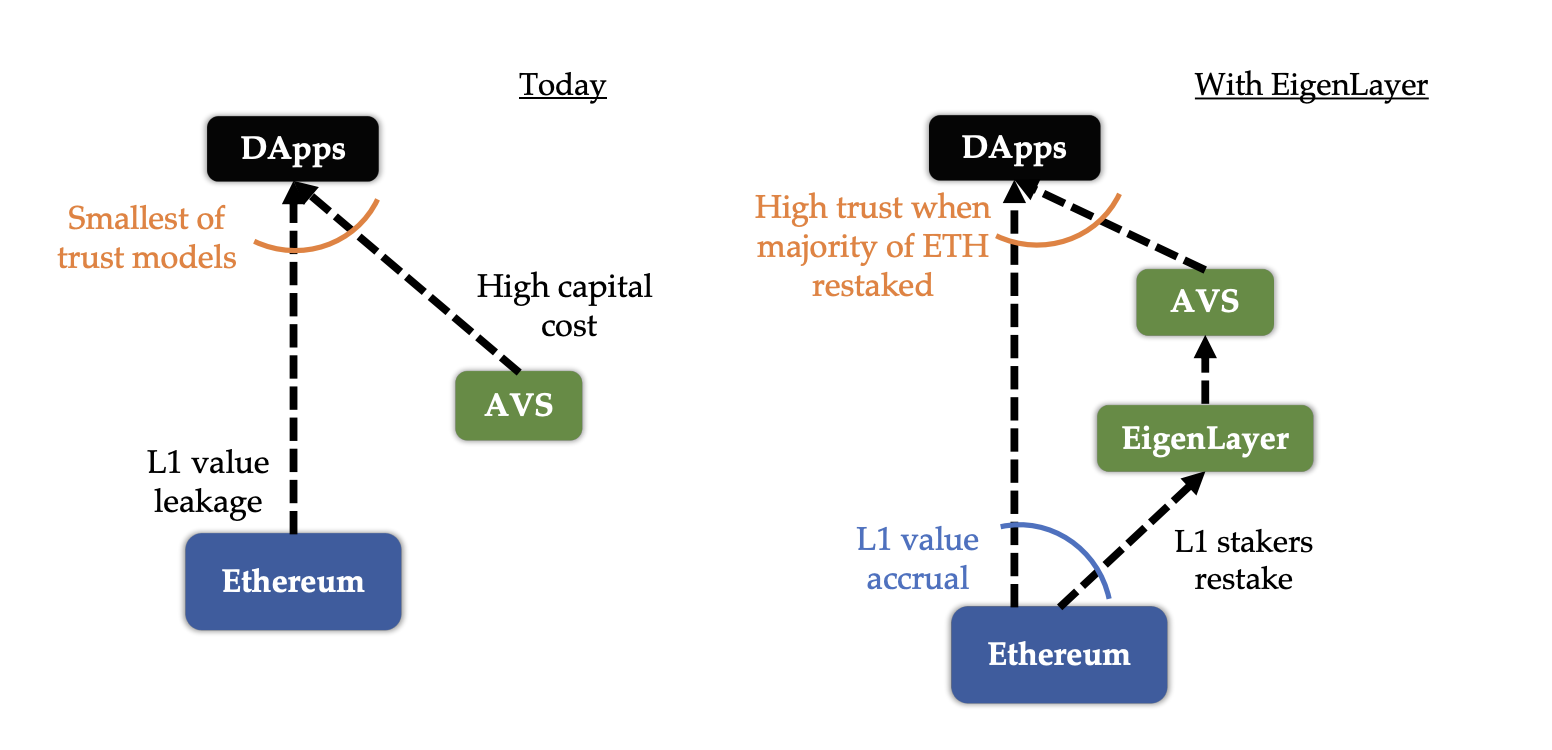
Restaking on EigenLayer amplifies yield, but it also amplifies exposure. When you restake ETH, you are not just securing the base layer; you are extending that security to Actively Validated Services (AVS). This creates a unique risk profile: if a validator signs a malicious transaction on an AVS, the entire restaked position—including the underlying ETH—can be slashed. This is not a theoretical edge case. As EigenLayer expands its ecosystem, the attack surface grows, making the security of your private keys the single most important factor in protecting your principal stake.
Hardware wallets are no longer optional extras for crypto enthusiasts; they are the standard defense for any serious restaker. Unlike hot wallets or exchange-held assets, hardware devices keep your private keys offline, isolated from internet-connected threats like phishing sites, malware, and exchange hacks. In 2026, with EigenLayer’s ecosystem mature and AVS integrations complex, the margin for error is slim. A single compromised key can lead to immediate and irreversible slashing across all restaked assets.
The complexity of restaking means you cannot rely on software-only security. You need a physical device that requires your explicit physical confirmation for every transaction. This simple step creates a critical barrier against remote attacks. While exchanges may offer staking services, they hold your keys, meaning you are trusting a third party with your entire restaked position. For long-term restakers, self-custody via a hardware wallet is the only way to ensure that your yield does not come at the cost of your principal.
Best hardware wallets for EigenLayer 2026
Choosing a hardware wallet for EIGEN requires balancing two competing needs: security and usability. Because EIGEN is an Ethereum-based token, it relies on the same underlying infrastructure as ETH and other ERC-20 assets. This means that most reputable hardware wallets that support Ethereum will also support EIGEN, provided they offer standard ERC-20 token management.
The decision often comes down to how you interact with EigenLayer. If you are a long-term holder storing EIGEN in a cold wallet, a device with a large screen and tactile navigation is preferable. If you plan to actively restake assets through EigenLayer’s Actively Validated Services (AVS) using a DeFi dashboard, you need a wallet that integrates smoothly with Web3 interfaces like MetaMask or Rabby. The following recommendations focus on devices that excel in these specific areas, ensuring your EIGEN remains secure while remaining accessible for staking operations.


As an Amazon Associate, we may earn from qualifying purchases.
The Ledger Nano X remains a top choice for many EigenLayer participants because of its Bluetooth capability. This allows you to manage your EIGEN and interact with staking dashboards directly from your phone, which is increasingly common as EigenLayer’s AVS ecosystem expands. The device’s secure element ensures that your private keys never leave the hardware, even when connected to a potentially compromised computer or mobile device.
For those who prefer a desktop-first workflow, the Trezor Model T offers a color touchscreen that makes verifying transaction details on-chain much easier. When you are signing a restaking transaction, the larger display allows you to read the smart contract interactions more clearly than on smaller monochrome screens. This added layer of verification is critical when dealing with the complex smart contracts involved in EigenLayer’s restaking mechanism.
If you are looking for a more modern experience with a larger form factor, the Ledger Stax provides a curved E-ink screen. This display is highly readable in various lighting conditions and allows you to customize the home screen with NFTs or logos, including EigenLayer branding. The Stax is particularly useful for users who want to visually confirm the details of complex transactions before signing, reducing the risk of interacting with malicious contracts.
Budget-conscious users might consider the Trezor Safe 3. While it lacks a touchscreen and Bluetooth, it retains the core security features necessary for storing EIGEN safely. It is an open-source device, meaning its code can be audited by the community, providing an extra layer of trust for privacy-focused users. For simple storage and occasional transactions, it offers robust protection without the premium price tag of more feature-rich models.
Comparing features for restakers
EigenLayer troubleshooting should start with a clear boundary: what is actually broken, and what still works normally. Check the display, network connection, paired devices, app access, and recent updates before assuming the whole system needs a reset. A small connection failure can make the main screen feel unreliable even when the core system is fine. Work from low-risk checks to deeper resets. Confirm power state, safe parking, account access, and signal first. Then restart the interface, wait for it to reload completely, and test the original symptom. Avoid changing multiple settings at once because that makes it harder to know which step actually fixed the problem. If the issue affects safety information, repeats after every restart, or appears with warning messages, treat the reset as a temporary diagnostic step rather than the final fix. Document the symptom and move to official support instead of stacking more DIY attempts.
| Factor | What to check | Why it matters |
|---|---|---|
| Fit | Match the option to the primary use case. | A good deal still fails if it does not fit the job. |
| Condition | Verify age, wear, and service history. | Hidden condition issues erase upfront savings. |
| Cost | Compare purchase price with likely upkeep. | The cheapest option is not always the lowest-cost option. |
Setting up your wallet for EigenLayer
Connecting your hardware wallet to EigenLayer interfaces requires careful attention to detail. The goal is to secure your EIGEN tokens while interacting with the EigenLayer ecosystem. A small mistake during setup can lead to significant losses, so follow these steps precisely.
Verify the official interface
Always start by navigating to the official EigenLayer website or a verified partner interface. Bookmark the URL to avoid phishing sites that mimic the real platform. Check the domain name carefully before entering any wallet information. This is your first line of defense against malicious actors.
Connect your hardware wallet
Use the "Connect Wallet" button on the interface and select your hardware wallet provider, such as Ledger or Trezor. Do not connect via a link sent in an email or social media message. Instead, type the URL directly into your browser or use your saved bookmark. This ensures you are interacting with the legitimate application.
Confirm transaction details
Before signing any transaction, review the details on your hardware wallet screen. Ensure the destination address and token amount match your expectations. If the interface requests access to your entire portfolio, deny it. Only approve transactions for specific actions you initiated. This step prevents unauthorized transfers of your EIGEN tokens.
Test with a small amount
After successful setup, send a small test amount of EIGEN to verify the connection. Confirm that the tokens appear in your wallet and can be transferred back if needed. This practice builds confidence in your setup before committing larger holdings. Once verified, you can proceed with larger restaking operations.
Frequently asked questions about EIGEN storage
Can I use any hardware wallet for EigenLayer?
Not all hardware wallets support EigenLayer directly. You need a device that allows custom smart contract interactions. Ledger and Trezor are the most common choices, but you must verify that the wallet software supports the specific EigenLayer contracts for restaking.
Is it safe to store EIGEN on a hardware wallet?
Hardware wallets are the safest option for long-term storage. They keep your private keys offline, protecting them from online hacks. For EigenLayer restaking, ensure your device firmware is updated to the latest version to support the newest smart contract standards.
Do I need to interact with the EigenLayer website directly?
No. You can manage your restaking through your hardware wallet’s interface or a compatible DeFi dashboard. Always double-check the contract address before signing any transaction. Never share your seed phrase or private key with any website or support agent.
No comments yet. Be the first to share your thoughts!